Showing posts with label Learn linux. Show all posts

Friday, September 13, 2013

Careers Opportunity in Linux

Careers Opportunity in Linux 

Careers Opportunity in Linux

•         System administrator
•         Network administrator
•         Software engineer
•         Trainer
•         Technical writer
•         Product marketing
•         Business consultant

Careers Opportunity in Linux


Wednesday, September 11, 2013

What is GCC In Linux

What is GCC In Linux

GCC, an acronym for GNU Compiler Collection, is a compiler generation framework which generates production quality optimizing compilers from descriptions of target platforms. It follows an open development model whereby its source is available for all for inspection and modification. It supports a wide variety of source languages and target machines (including operating system specific variants) in a ready-to-deploy form. Besides, new machines can be added by describing instruction set architectures and some other information (eg. calling conventions).
Novices may want to see the  Wikipedia introduction to GCC. For experts, the GCC page contains a wealth of information including installation instructions, reference manuals (which include users' guides as well as details of GCC internals), a set of frequently asked questions, a wiki page for the developers of GCC, additional reading material, and several mailing lists for more detailed issues and queries. Anexcellent description of GCC internals can also be found on Wikipedia.

What is GCC In Linux


"When Richard Stallman announced the first public release of GCC in 1987, few could have imagined the broad impact that it has had. It has prototyped many language features that later were adopted as part of their respective standards — everything from "long long" type to transactional memory. It deployed an architecture-neutral automatic vectorization facility, OpenMP, and Polyhedral loop nest optimization. It has provided the toolchain infrastructure for the GNU/Linux ecosystem used everywhere from Google and Facebook to financial markets and stock exchanges. We salute and thank the hundreds of developers who have contributed over the years to make GCC one of the most long-lasting and successful free software projects in the history of this industry."

Source Fr5om IIT Bombay

What is GCC In Linux


FOSS Security Features

FOSS Security Features

Open source software are very powerful and strong security. Thats why now a days Linux Os are used for Servers


FOSS Security Features

Some of the common Features foss:
  1. Iptables
  2. ConnTrack
  3. Anti-sniff
  4. SniffIt
  5. Roots
  6. Security focus, instead of user-friendliness

Now a days Hacking attempts on servers are frequent, malware, trojans and viruses are commonplace and tools to help the hacker are readily available. No software is 100% immune from security vulnerabilities but the open source process itself delivers superior security performance

FOSS Security Features

Saturday, August 31, 2013

Some Facts About Linux


Some Facts About Linux

1. Linux is not an OS, but it is the kernel, GNU Linux is the OS and it comes in several hundred flavors.

2. Linux Kernel was written by a 21 year finnish college student as a part of his hobby. Yup! His name is Linus Torvalds.

3. Torvalds created Linux based on GNU General Public License (GPL). Perhaps Torvalds would have never written his own kernel if GPL would be having it’s own kernel and driver.

4. Major part of today’s Linux kernel is written in C programming language and assembly language and only 2% of today’s kernel contains code written by Torvalds.

5. A Standard Linux Kernel of today has over 10 Million lines of code and it grows at the rate of 10% every year. About 4500 lines of codes are added and 1500 lines of code are changed everyday. Initially in 1991, Linux kernel version 0.01 was released with 10239 lines of code.


Some Facts About Linux


6. A guy named William Della Croce Jr. registered the name Linux and demanded royalty for using its name and mark. However he agreed to handover the trademark to Linus, later.

7. The Linux kernel’s official mascot is a penguin named Tux, abbreviation of tuxedo. The idea that Linux had a pet penguin comes from Linus Torvalds himself.


Source From : Computer Geeks


Some Facts About Linux

Thursday, August 15, 2013

Some Useful site About Tamil Linux OS

Some Useful site About Tamil Linux OS

●Primary Website for Tamil Linux is www.tamillinux.org

●Primary mailing list is tamilinix@yahoogroups.com

●Website for KDE - www.kde.org

●Website for GNOME - www.gnome.org

 * kaniyam For Linux Tamil  http://www.kaniyam.com/


●Website for Pango - www.pango.org


Some Useful site About Tamil Linux OS


Some Useful site About Tamil Linux OS

The Strengths of Linux


The Strengths of Linux


•         Stability

•         Security

•         Speed

•         Cost Low

•         Multiprocessing and other high-end features
Applications

The Strengths of Linux

Wednesday, August 14, 2013

About Linux From Scratch (LFS)

About Linux From Scratch (LFS)

What is Linux From Scratch?

Linux From Scratch (LFS) is a project that provides you with step-by-step instructions for building your own customized Linux system entirely from source.
Linux From Scratch (LFS)

Why would I want an LFS system?

Many wonder why they should go through the hassle of building a Linux system from scratch when they could just download an existing Linux distribution. However, there are several benefits of building LFS. Consider the following:
LFS teaches people how a Linux system works internally
Building LFS teaches you about all that makes Linux tick, how things work together and depend on each other. And most importantly, how to customize it to your own tastes and needs.
Building LFS produces a very compact Linux system
When you install a regular distribution, you often end up installing a lot of programs that you would probably never use. They're just sitting there taking up (precious) disk space. It's not hard to get an LFS system installed under 100 MB. Does that still sound like a lot? A few of us have been working on creating a very small embedded LFS system. We installed a system that was just enough to run the Apache web server; total disk space usage was approximately 8 MB. With further stripping, that can be brought down to 5 MB or less. Try that with a regular distribution.
LFS is extremely flexible
Building LFS could be compared to a finished house. LFS will give you the skeleton of a house, but it's up to you to install plumbing, electrical outlets, kitchen, bath, wallpaper, etc. You have the ability to turn it into whatever type of system you need it to be, customized completely for you.
LFS offers you added security
You will compile the entire system from source, thus allowing you to audit everything, if you wish to do so, and apply all the security patches you want or need to apply. You don't have to wait for someone else to provide a new binary package that (hopefully) fixes a security hole. Often, you never truly know whether a security hole is fixed or not unless you do it yourself.

What can I do with my LFS system?

A by-the-book LFS system is fairly minimal, but is designed to provide a strong base on which you can add any packages you want. See the BLFS project for a selection of commonly used packages.

Who's who:

  • Project Leader: Gerard Beekmans
  • Project Co-leader: Matthew Burgess
  • Project Co-leader: Bruce Dubbs
  • Plus numerous people who contribute to the book and its side projects.

About Linux From Scratch (LFS)

Sunday, August 4, 2013

Overview of Linux


Overview of Linux

The Linux operating system has many unique and powerful features. Like other operating systems, it is a control program for computers. But like UNIX, it is also a well-thought-out family of utility programs (Figure 1-1) and a set of tools that allow users to connect and use these utilities to build systems and applications.

Overview of Linux


  • Linux Has a Kernel Programming Interface
  • Linux Can Support Many Users
  • Linux Can Run Many Tasks
  • Linux Provides a Secure Hierarchical File system
  • The Shell: Command Interpreter and Programming Language
  • A Large Collection of Useful Utilities
  • Inter-process Communication
  • System Administration
  • Additional Features of Linux
1.      GUIs: Graphical User Interfaces
2.      (Inter)Networking Utilities
3.      Software Development

Overview of Linux


Saturday, August 3, 2013

What is Webmin in Linux


What is Webmin in Linux

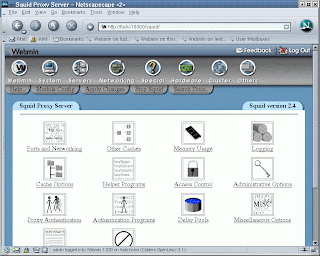
Webmin is a program that simplifies the process of managing a Linux or UNIX system. Traditionally, you have needed to manually edit configuration files and run commands to create accounts, set up web servers, or manage email forwarding. Webmin now lets you perform these tasks through an easy-to-use web interface, and automatically updates all of the required configuration files for you. This makes the job of administering your system much easier.


Some of the things that you can do with Webmin include:

• Creating, editing, and deleting UNIX login accounts on your system
• Exporting files and directories to other systems with the NFS protocol
• Setting up disk quotas to control how much space users can take up with their files
• Installing, viewing, and removing software packages in RPM and other formats
• Changing your system's IP address, DNS settings, and routing configuration
• Setting up a firewall to protect your computer or give hosts on an internal LAN access to the Internet
• Creating and configuring virtual web sites for the Apache Web server
• Managing databases, tables, and fields in a MySQL or PostgreSQL database server
• Sharing files with Windows systems by configuring Samba These are just a few of the available functions. Webmin lets you configure almost all of the common services and popular servers on UNIX systems using a simple web interface. It protects you from the syntax errors and other mistakes that are often made when editing configuration files directly, and warns you before potentially dangerous actions.

Because Webmin is accessed though a web browser, you can log in to it from any system that is connected to yours through a network. There is absolutely no difference between running it locally and running it remotely, and it is much easier to use over the network than other graphical configuration programs.

Webmin has what is known as a modular design. This means that each of its functions is contained in a module that can generally be installed or removed independently from the rest of the program. Each module is responsible for managing some service or server, such as UNIX users, the Apache Web server, or software packages.
What is Webmin in Linux
If you have been manually configuring your system up till now, any existing settings will be recognized by Webmin. It always reads the standard configuration files on your system and updates them directly, instead of using its own separate database. This means that you can freely mix Webmin, manual configuration, and other programs or scripts that work in the same way. Even though this book is written for Linux users, Webmin can be used on many other flavours of UNIX as well, such as Solaris, FreeBSD, and HP/UX. One of its biggest strengths is its understanding of the differences between all these operating systems and the way it adjusts its user interface and behavior to fit your OS. This means that it can often hide the underlying differences between each UNIX variant and present a similar or identical interface no matter which one you are using. Webmin on its own is not particularly useful though—it is only a configuration tool, so you must have programs installed for it to configure. For example, the Apache module requires that the actual Apache Web server be installed. Fortunately, all of the services and servers that Webmin manages are either included with most Linux distributions as standard, or can be freely downloaded and installed

What is Webmin in Linux


Thursday, August 1, 2013

What is GNU GENERAL PUBLIC LICENSE (GPL)


What is GNU GENERAL PUBLIC LICENSE (GPL)

  • The Free Software Foundation published the first version of the GPL in 1989.
  • GPL is the most common open-source license in use.
  • The Linux OS kernel is licensed under GPL.
What is GNU GENERAL PUBLIC LICENSE (GPL)

The GNU General Public License (GNU GPL or GPL) is the most widely used[5] free software license, which guarantees end users (individuals, organizations, companies) the freedoms to use, study, share (copy), and modify the software. Software that ensures that these rights are retained is called free software. The license was originally written by Richard Stallman of the Free Software Foundation (FSF) for the GNU project.

What is GNU GENERAL PUBLIC LICENSE (GPL)


Why Linux Is Portable


Why Linux Is Portable

A portable operating system is one that can run on many different machines. More than 95 percent of the Linux operating system is written in the C programming language, and C is portable because it is written in a higher-level, machine-independent language. (The C compiler is written in C.) Because Linux is portable, it can be adapted (ported) to different machines and can meet special requirements. For example, Linux is used in embedded computers, such as the ones found in cellphones, PDAs, and the cable boxes on top of many TVs.

 The file structure takes full advantage of large, fast hard disks. Equally important, Linux was originally designed as a multiuser operating system—it was not modified to serve several users as an afterthought. Sharing the computer’s power among many users and giving them the ability to share data and programs are central features of the system. Because it is adaptable and takes advantage of available hardware, Linux runs on many different microprocessor-based systems as well as mainframes. 

Why Linux Is Portable


The popularity of the microprocessor-based hardware drives Linux; these microcomputers are getting faster all the time, at about the same price point. Linux on a fast microcomputer has become good enough to displace workstations on many desktops. This widespread acceptance benefits both users, who do not like having to learn a new operating system for each vendor’s hardware, and system administrators, who like having a consistent software environment. 


The advent of a standard operating system has given a boost to the development of the software industry. Now software manufacturers can afford to make one version of a product available on machines from different manufacturers.

Why Linux Is Portable


Wednesday, July 31, 2013

SHORT HISTORY OF OPEN SOURCE


SHORT HISTORY OF OPEN SOURCE

  • The early days: Collaborative software development is not formalized.

  • 1983: Former MIT employee Richard Stallman starts the GNU project. The project has since created an enormous body of open-source software.

  • 1985: Stallman forms the Free Software Foundation (FSF), a socio-political organization that promotes what it calls “free” software.
SHORT HISTORY OF OPEN SOURCE

  • 1991: Finnish computer science student Linus Torvalds invites people to contribute to a free operating system and makes the first release of the Linux kernel software.

  • 1998: The term open source is coined.

  • Today: Many vendors provide support for open-source software, such as Linux distributions, which typically bundle the Linux kernel with GNU programs and a graphical interface.

SHORT HISTORY OF OPEN SOURCE

THE OPEN SOURCE INITIATIVE (OSI)


THE OPEN SOURCE INITIATIVE (OSI)

  • OSI is a non-profit organization that works to promote open-source software.
  • OSI maintains a definition of open source.
  • OSI maintains a list of OSI-approved software licenses (at present, more than 50).
    THE OPEN SOURCE INITIATIVE (OSI)
  • OSI states that “open source promotes software reliability and quality by supporting independent peer review and rapid evolution of source code.”

THE OPEN SOURCE INITIATIVE (OSI)


Tuesday, July 23, 2013

ABOUT NS2 NETWORK SIMULATOR


NS-2 is a very popular discrete event Network Simulator which is widely used in the research  field of Wired, Wireless and Satellite Networks  across both academia and industry as a way of  designing, testing and evaluating new and  existing protocols and architectures, and has also proven a very useful tool for teaching purposes.
ABOUT NS2 NETWORK SIMULATOR

NS-2 comes fully equipped of protocols, models, algorithms and accessory tools. NS-2 is an open source network simulator which is freely available for academic research purpose. Therefore, in terms of scientific acceptance, number of tools/modules and cost, NS-2 would be a sort of ideal choice.

NS-2 started as a variant of the REAL network simulator in 1989 and has since been supported by the Virtual InterNetwork Testbed (VINT) project that is a DARPA-funded research project whose aim is to build a network simulator. The first version of NS was for wired networks but the demand to support wireless networking made the Monarch Group to create new version NS-2. NS-2 uses two languages C++ to implement protocols and Object Oriented Tcl (OTcl) for configuration and simulation the scripts.

How to Run NS2 Program in Linux


Thursday, July 18, 2013

Shell Command Cheat Sheet For Linux OS


Shell Command Cheat Sheet For Linux OS


A
  • alias Create an alias
  • awk Find and Replace text within file(s)

B
  • break Exit from a loop
  • builtin Run a shell builtin

C
  • cal Display a calendar
  • case Conditionally perform a command
  • cat Display the contents of a file
  • cd Change Directory
  • chgrp Change group ownership
  • chmod Change access permissions
  • chown Change file owner and group
  • chroot Run a command with a different root directory
  • cksum Print CRC checksum and byte counts
  • clear Clear terminal screen
  • cmp Compare two files
  • comm Compare two sorted files line by line
  • command Run a command - ignoring shell functions
  • continue Resume the next iteration of a loop
  • cp Copy one or more files to another location
  • cron Daemon to execute scheduled commands
  • crontab Schedule a command to run at a later time
  • csplit Split a file into context-determined pieces
  • cut Divide a file into several parts
Shell Command Cheat Sheet For Linux OS


D
  • date Display or change the date & time
  • dc Desk Calculator
  • dd Data Dump - Convert and copy a file
  • declare Declare variables and give them attributes
  • df Display free disk space
  • diff Display the differences between two files
  • diff3 Show differences among three files
  • dir Briefly list directory contents
  • dircolors Colour setup for `ls`
  • dirname Convert a full pathname to just a path
  • dirs Display list of remembered directories
  • du Estimate file space usage

E
  • echo Display message on screen
  • ed A line-oriented text editor (edlin)
  • egrep Search file(s) for lines that match an extended expression
  • eject Eject CD-ROM
  • enable Enable and disable builtin shell commands
  • env Display, set, or remove environment variables
  • eval Evaluate several commands/arguments
  • exec Execute a command
  • exit Exit the shell
  • expand Convert tabs to spaces
  • export Set an environment variable
  • expr Evaluate expressions

F
  • factor Print prime factors
  • false Do nothing, unsuccessfully
  • fdformat Low-level format a floppy disk
  • fdisk Partition table manipulator for Linux
  • fgrep Search file(s) for lines that match a fixed string
  • find Search for files that meet a desired criteria
  • fmt Reformat paragraph text
  • fold Wrap text to fit a specified width.
  • for Expand words, and execute commands
  • format Format disks or tapes
  • free Display memory usage
  • fsck Filesystem consistency check and repair.
  • function Define Function Macros
G
  • gawk Find and Replace text within file(s)
  • getopts Parse positional parameters
  • grep Search file(s) for lines that match a given pattern
  • groups Print group names a user is in
  • gzip Compress or decompress named file(s)

H
  • hash Remember the full pathname of a name argument
  • head Output the first part of file(s)history Command History
  • hostname Print or set system name

I
  • id Print user and group id’s
  • if Conditionally perform a command
  • import Capture an X server screen and save the image to file
  • info Help info
  • install Copy files and set attributes
J
  • join Join lines on a common field
K
  • kill Stop a process from running
L
  • less Display output one screen at a time
  • let Perform arithmetic on shell variables
  • ln Make links between files
  • local Create variables
  • locate Find files
  • logname Print current login name
  • logout Exit a login shell
  • lpc Line printer control program
  • lpr Off line print
  • lprint Print a file
  • lprintd Abort a print job
  • lprintq List the print queue
  • lprm Remove jobs from the print queue
  •  ls List information about file(s)
M
  • m4 Macro processor
  • man Help manual
  • mkdir Create new folder(s)
  • mkfifo Make FIFOs (named pipes)
  • mknod Make block or character special files
  • more Display output one screen at a time
  • mount Mount a file system
  • mtools Manipulate MS-DOS files
  • mv Move or rename files or directories
N
  • nice Set the priority of a command or job
  • nl Number lines and write files
  • nohup Run a command immune to hangups
P
  • passwd Modify a user password
  • paste Merge lines of files
  • pathchk Check file name portability
  • popd Restore the previous value of the current directory
  • pr Convert text files for printing
  • printcap Printer capability database
  • printenv Print environment variables
  • printf  Format and print data
  • ps Process status
  • pushd Save and then change the current directory
  • pwd shows Present Working Directory*
Q
  • quota Display disk usage and limits
  • quotacheck Scan a file system for disk usage
  • quotactl Set disk quotas
R
  • ram ram disk device
  • rcp Copy files between two machines.
  • read read a line from standard input
  • readonly Mark variables/functions as readonly
  • remsync Synchronize remote files via email
  • return Exit a shell function
  • rm Remove files
  • rmdir Remove folder(s)
  • rpm Remote Package Manager
  • rsync Remote file copy (Synchronize file trees)
S
  • scp Secure copy (remote file copy)
  • screen Terminal window manager
  • sdiff Merge two files interactively
  • sed Stream Editor
  • select Accept keyboard input
  • seq Print numeric sequences
  • set Manipulate shell variables and functions
  • shift Shift positional parameters
  • shopt Shell Options
  • shutdown Shutdown or restart linux
  • sleep Delay for a specified time
  • sort Sort text files
  • source Run commands from a file `.'
  • split Split a file into fixed-size pieces
  • ssh secure Shell client (remote login program)
  • su Switch to super-user (root)
  • sudo Execute the command as super-user (root)
  • sum Print a checksum for a file
  • symlink Make a new name for a file
  • sync Synchronize data on disk with memory
T
  • tac Concatenate and write files in reverse
  • tail Output the last part of files
  • tar Tape ARchiver
  • tee Redirect output to multiple files
  • test Evaluate a conditional expression
  • time Measure Program Resource Use
  • times User and system times
  • touch Change file timestamps
  • top List processes running on the system
  • traceroute Trace Route to Host
  • trap Run a command when a signal is set(bourne)
  • tr Translate, squeeze, and/or delete characters
  • true Do nothing, successfully
  • tsort Topological sort
  • tty Print filename of terminal on stdin
  • type Describe a command
U
  • ulimit Limit user resources
  • umask Users file creation mask
  • umount Unmount a device
  • unalias Remove an alias
  • uname Print system information
  • unexpand Convert spaces to tabs
  • uniq Uniquify files
  • units Convert units from one scale to another
  • unset Remove variable or function names
  • unshar Unpack shell archive scripts
  • until Execute commands (until error)
  • useradd Create new user account
  • usermod Modify user account
  • users List users currently logged in
  • uuencode Encode a binary file uudecode Decode a file created by uuencode
V
  • v Verbosely list directory contents
  • vdir Verbosely list directory contents
  • vi Text Editor
W
  • watch Execute/display a program periodically
  • wc Print byte, word, and line counts
  • wget Retrieve web pages or files via HTTP, HTTPS or FTP
  • whereis Report all known instances of a command
  • which Locate a program file in the user's path.
  • while Execute commands
  • who Print all usernames currently logged in
  • whoami Print the current user id and name
X
  • xargs Execute utility, passing constructed argument list(s)
Y
  • yes Print a string until interrupted
  • period Run commands from a file
  • ### Comment / Remark

Shell Command Cheat Sheet For Linux OS

Linux Tips and tricks,Online Linux Helpers